USBCAN-II C is an industrial CAN-bus communication interface card integrated with two CAN interfaces. This type of can card can be compatible with the full speed specification of USB2.0 bus. Using USBCAN-II C interface card, PC can be quickly connected to CAN-bus network through USB interface to form a CAN-bus network control node for data processing and data acquisition in the field of CAN-bus network,such as fieldbus laboratory, industrial control, intelligent community, automotive electronic network and so on.
USBCAN-II C Features
-
The PC interface conforms to the USB2.0 full speed specification and is compatible with USB1.1
-
Integrated 2-way CAN-bus interface, Phoenix terminal connection mode;
-
supports CAN2.0A and CAN2.0B frame formats and conforms to the ISO/DIS 11898 specification;
-
The baud rate of CAN-bus communication is arbitrarily programmable from 5Kbps to 1Mbps
-
Use USB bus power supply, or add external power supply (DC5-24V, 130mA)
-
when the power supply is insufficient;
-
CAN-bus interface adopts electrical isolation, isolation module insulation voltage: DC 1500V;
-
Maximum received data flow: 8000 fps;
-
Support Win2000, WinXP, Win7, Win8, Win10 and other Windows operating systems;
-
Support ECANTools, CAN Test, CAN Pro test software;
-
Working temperature range: -20℃~+70℃;
All types of GCAN USBCAN products support secondary development. We provide secondary development dynamic and static link libraries, and provide development routines and routine source codes. The library functions are simple and convenient to use. Users can quickly apply our USBCAN devices in your own project.Specifications
|
|
Physical
|
| Size (LxWxH) |
102 x 63 x 27 mm |
|
| Weight |
approx.100g |
|
| Operating temperature |
-40°C~85°C |
|
| Humidity |
15 to 90%RH non-condensing |
|
|
Connectivity
|
| CAN channel |
1 |
|
| CAN connector |
OPEN 6 Phoenix Terminal |
|
| CAN interface |
Compliant with CAN 2.0A, CAN 2.0, conform to ISO11898 |
|
| CAN baud rate |
5kbit/s to 1Mbit/s |
|
| USB interface |
USB 2.0, compatible with USB 1.1 and USB 3.0 |
|
| Isolation |
DC 1500V electrical isolation |
|
|
Power supply
|
| Power Supply |
USB powered |
|
| Current |
Max 130mA |
|
|
Software
|
| Software support |
ECAN Tools |
|
| Operation system |
Windows XP/7/8/10,etc |
|
| Development environment |
VC,VB,C,C+,C++,C++Builder,NET,Labwindows,Delphi,LabVIEW,etc |
USBCAN-II C Functions
1.Automatic baud rate recognition function
It can automatically identify the baud rate of a bus with an unknown baud rate. As long as it is an active CAN bus, our company’s equipment can identify its baud rate. There are two ways to identify the baud rate:
A: Standard baud rate recognition.(1000K, 500K, 250K…)
B: Full range of baud rate recognition.(set the start and end range, scan the baud rate in the range)
This function can send and receive data after identifying devices with unknown baud rate, and can also be used to test the baud rate of newly developed CAN communication devices.

2.Basic CAN data transceiver function
The software can send and receive CAN bus standard data, support CAN2.0A, CAN2.0B frame format sending and receiving, support data frame, remote frame sending and receiving. The software receiving list can receive up to 1 million frames of data, and the receiving list can be saved locally in 3 formats-text file (.TXT), batch file (.CAN), excel file (.csv), this function is convenient The user performs data storage and processing analysis, and the batch file can be sent back to the CAN bus through software.

3.Advanced CAN bus data transmission function
When sending data, you can set the normal sending mode and the list sending mode. The list mode can edit multiple CAN data. The CAN data in the sending list can be sent simultaneously and cyclically, and the sending list can be saved/loaded.
The file sending function can send the batch file (.CAN) back to the CAN bus according to the time sequence information when receiving. The batch file can be edited through the notepad, and the edited file can be sent according to the content actually written by the user.
This function can be used as a signal simulator for automotive electronics users. For example, the car navigation is controlled by the CAN signal to turn on. The user can intercept a piece of data containing the car navigation startup signal without having to find the startup signal from these data. After removing the navigation from the car, resend this piece of data to the navigation to start the navigation without ECU.

4.Receive real-time statistics
The receiving statistics function can count the received data according to the corresponding rules in real time. The statistical rules include: frame name, frame ID, frame format, frame type, and frame data. After the classification rules are set, when the received data meets the classification rules , The software will automatically merge the data that meets the rules and count the merged quantity. This function is very useful when the amount of data on the bus is large. After the same frame is combined, it is convenient to observe and analyze other data.
There are many nodes on the automobile CAN bus that periodically send the same data to the bus to communicate with the ECU. And these same data will often dazzle data analysts and cause interference to the analysis of other useful data on the bus. Flexible use of the receiving statistics function can combine the data sent repeatedly in a loop. At this time, if there are new ones on the bus The data is sent out, you can see it intuitively.

5.Data multi-segment filtering function
The software can set the receiving filter, and you can specify the display of data beginning with certain frame IDs by setting the receiving filter list. By setting the frame ID filter range, the frame ID data in the display range is reached, and the data outside the range is shielded. Multiple frame ID ranges can be added to the filter list, and standard frames and extended frames can be set. This function is very convenient to filter out unwanted data and facilitate data analysis.
This function is used to filter the frame ID that you don’t want to see. If the user is only interested in the data sent by a certain frame ID, the data can be displayed intuitively by setting the filtering method.

6.Data intelligent shielding function
The software can be set to receive shielding, and the data of the specified ID can not be displayed by selecting the frame ID that needs to be shielded. After the software receives the data, enter the mask setting interface to display the frame ID of the currently received data. By adding the mask list, the data starting with the specified frame ID will be masked, and the frame ID will no longer be displayed in the future All the data. This function is convenient for shielding data that you don’t want to see, and for data analysis.
This function is very suitable for systems with large data traffic such as automobile CAN bus. The data volume conference dazzled analysts, but in fact, they don’t care about a lot of data. Flexible use of the shielding function can greatly reduce the workload of analysts. Users can shield the data they do not care about when observing the data, which is convenient for later data processing.

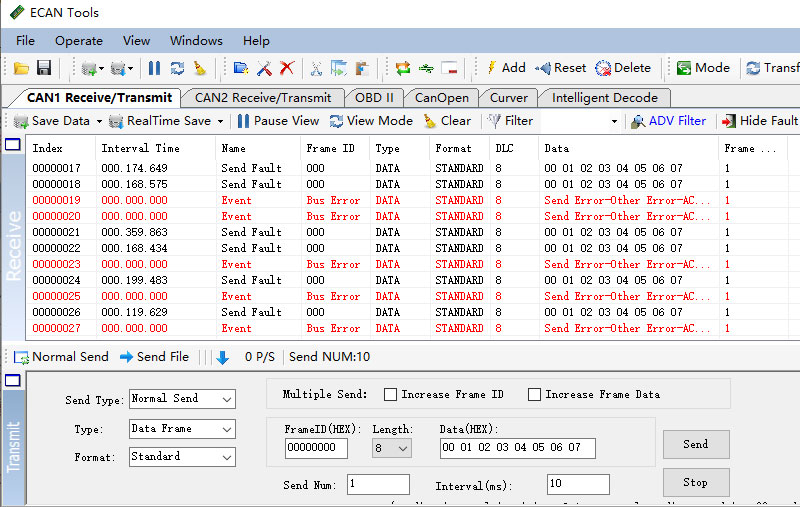
7.Error frame receiving function
Software can receive error frames on the bus. When an error frame is generated on the bus, it will cause interference to the bus, and in severe cases, the bus will be completely paralyzed. The ECAN Tools software can receive the type and status of the error frame so that the user can find the bus communication faulty node in time and repair or replace it in time.
The slave function can find out the device sending the error frame for repair or replacement by disconnecting all nodes on the bus in turn.
CAN Test software function
DBC file analysis function: it can be used for charging pile BMS protocol analysis, vehicle CAN J1939 protocol analysis, vehicle test and maintenance, vehicle data cracking, etc.
Bus flow statistics function: the software can count the bus data flow in real time and display it through drawing.
Time sequence sending data function: the data in the list can be sent according to the sequence, and the sending list can edit 100 items. This function is convenient for debugging the protocol that needs to send the data according to the sequence.
File saving function: the data in the receiving list can be saved locally, and it supports text file format (.txt) and excel format (.csv)
Language switching function: the software supports both Chinese and English
CAN Pro protocol analysis software function
CAN upper layer protocol data analysis: It can parse standard CAN bus upper layer protocols, including: DeviceNet, SAE J1939, CANOpen, ICAN, etc.
Custom protocol analysis: Users can use scripts to define their own protocols. After the custom protocol is programmed into the software according to the rules, when the received data conforms to the protocol, the software will automatically analyze it according to the user’s editing.
Trigger function: The user can pre-set the trigger condition and the data or file to be sent. After the trigger setting is activated, the trigger function will be activated when data that meets the conditions is received. The trigger function can pause the display, send data, and send files. This function can be used for special message positioning and detection.
Data playback, offline playback function: This function can load the batch file (.CAN) saved by CAN Pro software into the sending list, and the data in the file can be resent back to the CAN bus according to the time sequence when saving.
Physical quantity extraction and graphic display function: After the software loads the DBC file, it can display the data changes in real time through graphs, curves, etc. The user can analyze the data by observing the curve or graph. The software can also support the loading of custom protocols, and graphs and curves can be drawn after loading user-defined protocols.
USBCAN-II C User Manual(Click to view)